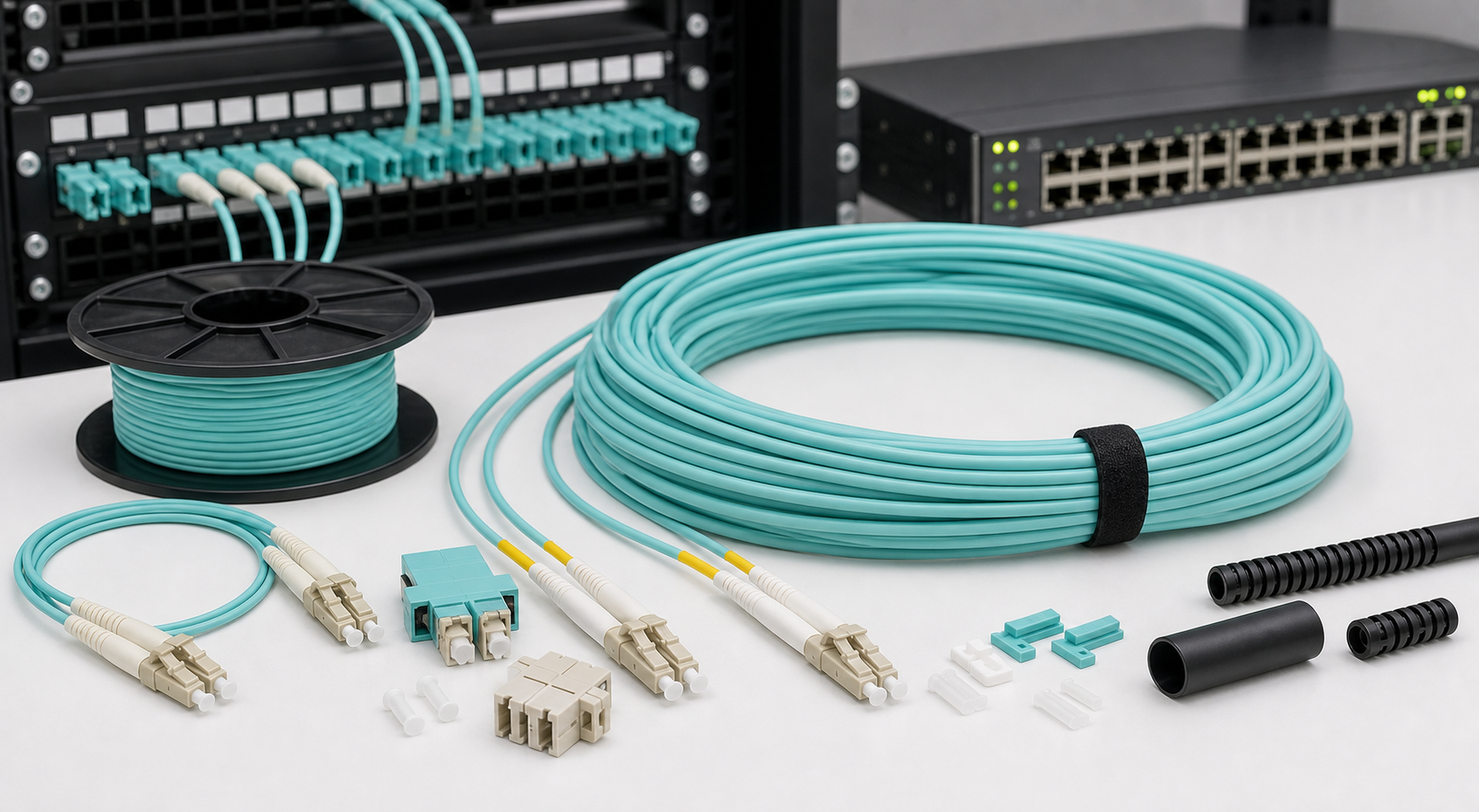
Multimode Fiber Cable Kenya is an important topic for data rooms, offices, schools, hospitals, hotels, factories, CCTV control rooms, server cabinets, storage networks, and campus buildings that need fast short-distance fiber links. While many outdoor and long-distance projects use single-mode fiber, multimode fiber remains useful where high bandwidth is needed over shorter controlled routes, especially inside buildings, server rooms, equipment racks, and data cabinets. It is common in local area networks where switches, servers, storage devices, patch panels, and network cabinets sit within the same room, floor, or building.
Multimode fiber cable carries light through a larger core than single-mode fiber. That larger core allows multiple light paths, or modes, to travel through the fiber. The design makes multimode practical for short links with compatible LED or VCSEL-based optics, especially 1G, 10G, 40G, and sometimes 100G applications over limited distances. For Kenyan buyers, the key is not to ask whether multimode is better or worse than single-mode in general. The right question is whether the route length, equipment, budget, and future upgrade plan match multimode's strengths.
This guide explains where multimode fiber fits in Kenya, how OM1, OM2, OM3, OM4, and OM5 differ, what accessories are needed, how it compares with single-mode fiber, how to estimate cost, and how to avoid common installation mistakes. For related planning, read our internal guides on Fiber Optic Cable Kenya, Single Mode Fiber Cable Kenya, Fiber Optic Internet Kenya, Fiber Optic Technicians Kenya, Fiber Optic Network Installation Kenya, and booking a fiber installation survey. For external connectivity and equipment context, compare satellite internet installation options, Amazon Internet Kenya, and network hardware from Mikrotik Kenya.

What is multimode fiber cable?
Multimode fiber cable is optical fiber with a larger core than single-mode fiber. Common multimode core sizes include 50 microns and 62.5 microns. Because the core is larger, light can travel through the cable in several paths. This makes multimode suitable for short-distance high-speed links when matched with the correct optics and transceivers. It is widely used in data centers, server rooms, LAN backbones, storage networks, and short building links.
Multimode fiber is not usually the best choice for long outdoor routes or ISP-style backbones. Its signal performance is limited by modal dispersion, which becomes more significant as distance increases. That does not make multimode poor technology. It simply means it should be used where it is strongest: controlled indoor routes, short high-speed links, and equipment environments where multimode optics may be cost-effective and easy to deploy.
In Kenya, multimode appears in office server cabinets, campus ICT rooms, hotel network racks, hospital data rooms, school computer labs, CCTV command rooms, and enterprise switching environments. A business may use single-mode fiber for the outdoor connection between buildings, then multimode patching inside a data room. Many networks use both technologies, with each cable type selected for the correct role.
OM1, OM2, OM3, OM4, and OM5 explained
Multimode fiber is commonly described using OM categories. OM1 is older 62.5/125 micron fiber and is usually associated with orange jackets. OM2 is 50/125 micron fiber and may also appear in orange. OM3 is laser-optimized 50/125 micron fiber and is commonly aqua. OM4 is also laser-optimized and often aqua or violet, with better performance over distance than OM3. OM5 is a newer wideband multimode type, often lime green, designed for short wavelength division multiplexing in specialized environments.
For modern installations in Kenya, OM3 and OM4 are usually more relevant than OM1 and OM2. OM1 and OM2 may still be found in older buildings, but they can limit upgrade options. If a business is installing new multimode fiber for 10G or future high-speed switching, OM3 or OM4 is normally the more sensible discussion. The exact choice depends on distance, equipment, required speed, and budget.
Do not rely only on jacket color. Cable markings, supplier documentation, and test records should confirm the fiber type. Patch cords, pigtails, adapters, and transceivers must match the chosen fiber category. If an existing site has unknown multimode cable, test and identify it before buying new optics. Guessing can lead to link instability, poor speed, or wasted equipment purchases.
Multimode vs single-mode fiber
Single-mode fiber has a smaller core and is better for longer distances, provider links, outdoor routes, FTTH, campus backbones, and future-proof long-haul connections. Multimode has a larger core and is often used for shorter links inside buildings and data rooms. Single-mode optics used to be more expensive, but prices have changed over time, so the cost gap is not always as large as buyers expect.
The choice should be based on the route and application. If you are connecting two buildings across a compound, a gatehouse, a CCTV pole, or a remote warehouse, single-mode is usually the safer choice. If you are connecting switches in the same rack, two cabinets in one server room, or short backbone links inside a building, multimode may be practical. The wrong choice can limit future upgrades or force expensive changes later.
Some Kenyan businesses choose single-mode for all new permanent routes because it offers strong distance flexibility. Others use multimode in data rooms because existing switches, optics, and patching standards already support it. Both approaches can be correct. The important thing is to document the decision and avoid mixing fiber types without a clear plan.
Where multimode fiber is used in Kenya
Multimode fiber is often used in data cabinets and server rooms. It can connect a core switch to distribution switches, storage devices, servers, firewalls, or aggregation switches. In a hotel, it may connect equipment cabinets on the same floor or nearby ICT rooms. In a hospital, it may support high-speed links between network cabinets and systems that need fast internal data transfer. In a school or university, it may support computer labs, libraries, administration networks, and short campus distribution links where distances are within the supported limit.
CCTV control rooms can also use multimode inside cabinets, especially where video recorders, switches, and storage devices sit close together. However, long camera routes around a compound are often better served by single-mode fiber. A good CCTV design may therefore use single-mode for outdoor perimeter runs and multimode or copper patching inside the control room.
Factories and warehouses may use multimode where cabinets are close enough and electrical interference makes copper less attractive. Still, industrial routes should be assessed carefully. Distance, heat, dust, vibration, power equipment, and physical damage risk may push the design toward armoured single-mode or protected fiber routes instead. The site survey should decide, not habit.

Connectors, patch cords, and transceivers
Modern multimode links commonly use LC connectors, especially with SFP and SFP+ modules. SC connectors are still found in some patch panels and older environments. The connector type must match the patch panel, transceiver, and equipment ports. Duplex patch cords are common because one strand transmits and the other receives. Patch cords should be the correct multimode category, not random fiber cords chosen only by color.
Transceivers matter. A switch with an SFP or SFP+ slot does not automatically support every optic. The optic must match the speed, fiber type, wavelength, distance, and equipment compatibility. Common multimode optics include 1000BASE-SX for 1G and 10GBASE-SR for 10G. Higher speeds have their own requirements and distance limits. Always check switch documentation before buying optics.
Cleaning is also important. Multimode connectors can suffer from dust, scratches, fingerprints, and poor seating. A link may work briefly and then become unstable if connectors are dirty or bent sharply. Use dust caps, cleaning pens, lint-free wipes, and proper handling procedures. Good fiber practice is cheaper than troubleshooting random link drops later.
Distance and speed planning
Distance is the main planning factor for multimode fiber. The supported distance depends on fiber category, speed, wavelength, and transceiver type. A cable that works for 1G may not support 10G over the same distance. OM3 and OM4 support higher speeds over better distances than older OM1 and OM2, but they still have limits. For permanent building routes, verify the expected speed today and the likely speed in the next upgrade cycle.
A common mistake is installing multimode because the current link is short, then later discovering that the cable category cannot support a planned speed upgrade. Another mistake is extending a route beyond what the selected optics can handle. For important links, design the optical budget and keep records of cable length, fiber type, connector count, patch panels, and test results.
When distance is uncertain, single-mode may be safer. When the route is known, short, controlled, and matched to the right optics, multimode can be effective. The decision should be written into the project design so future technicians know what was installed and why.
Installation and cable management
Multimode fiber should be installed with the same care as any optical cable. Avoid tight bends, crushing, pulling stress, sharp edges, and messy patching. Inside cabinets, patch cords should be routed through cable managers and given enough slack without forming tight loops. Patch panels should be labelled, and unused ports should have dust caps. Cabinet doors should close without pressing against fiber cords.
Indoor multimode cable may be tight-buffered, riser-rated, or suitable for specific building pathways. Do not run indoor cable outdoors unless it is rated for that environment. If a route passes between buildings, through ducts, or near rough conditions, the cable construction must match the route. Sometimes the correct design is outdoor single-mode to the building and multimode patching only inside the cabinet.
Documentation saves time. A finished installation should include labels, port maps, fiber type, cable length, core allocation, patching records, and test results. This matters when upgrading switches, replacing optics, troubleshooting outages, or onboarding a new IT provider. Without documentation, even a neat cabinet can become difficult to maintain.
Testing multimode fiber cable
Testing confirms that a multimode link is ready for service. Basic continuity checks show whether light passes through, but they do not fully prove the link is within acceptable loss limits. Optical power testing helps confirm whether the transmitter and receiver have enough margin. For higher-speed links, proper testing becomes more important because small losses and poor connectors can affect stability.
OTDR testing can be useful for longer or more important fiber routes, although multimode OTDR testing requires correct launch conditions and interpretation. For many short cabinet links, careful inspection, cleaning, correct patch cords, and power testing may be enough. The right test depends on the link's importance, length, and service requirements.
When troubleshooting, isolate variables. Test the patch cord, transceiver, switch port, patch panel, and cable route. Swap components carefully and document what changes. Many faults are caused by dirty connectors, wrong optics, damaged patch cords, mixed fiber types, or unsupported switch modules rather than the installed cable itself.

Multimode fiber cable prices in Kenya
Prices vary by cable category, brand, length, core count, connector type, indoor rating, patch cord length, transceiver speed, and installation complexity. A short LC-LC OM3 patch cord is very different from a multi-core indoor backbone cable with patch panels, pigtails, termination, testing, and documentation. The final project cost may include cable, patch cords, adapters, ODFs, SFP modules, switches, cable managers, labels, labour, and testing.
When comparing quotes, ask whether the cable is OM3, OM4, or another category. Ask what speed and distance it is designed to support. Ask whether optics are included and whether the installer will test the link after installation. A cheap quote that omits transceivers, patch panels, cleaning, testing, or documentation can become expensive during commissioning.
For many Kenyan buyers, the best value is not simply the lowest cable price. It is the solution that supports the required speed, works with the switches, leaves the cabinet tidy, includes test results, and does not block future upgrades. Fiber is infrastructure. Poor choices hidden inside a rack or ceiling can cause years of avoidable troubleshooting.
Choosing an installer or supplier
Choose a supplier or installer who understands the difference between multimode and single-mode, not one who sells all fiber as if it is the same. They should ask about distance, speed, switch model, SFP type, patch panel, rack layout, future upgrades, and whether the route is indoor or outdoor. They should also be able to explain why OM3 or OM4 is suitable for your project.
Look for neat cabinet work, correct bend radius, clean connectors, labelled ports, proper patch cords, and test records. If the project touches active equipment, the technician should understand SFP compatibility and basic switching. Many multimode problems appear when the physical link and active equipment are specified separately by different people.
If the route is part of a wider network upgrade, include router, switch, Wi-Fi, CCTV, and backup internet planning in the same conversation. A fast fiber link inside the building will not solve a weak internet package, poor Wi-Fi, or an overloaded router. The whole network must be planned around real usage.
Common mistakes to avoid
- Installing older OM1 or OM2 cable for a new high-speed project without checking future requirements.
- Choosing multimode for a route that should be single-mode because of distance or outdoor conditions.
- Buying optics without checking switch compatibility, speed, wavelength, and distance limits.
- Mixing multimode and single-mode patch cords, pigtails, or adapters without a clear design.
- Ignoring connector cleaning and dust protection.
- Creating tight patch cord loops or closing cabinet doors against fiber cables.
- Skipping labels, port maps, and test records.
- Comparing quotes only by cable price instead of installed and tested performance.
Most multimode fiber problems are caused by design mismatch, poor handling, wrong optics, weak documentation, or untidy cabinet work. These are preventable. The project should start with speed, distance, equipment, and upgrade goals, then select cable and accessories that fit those requirements.
FAQ: Multimode Fiber Cable Kenya
Is multimode fiber good for long distances?
No. Multimode is best for shorter links, especially inside buildings, racks, and data rooms. Single-mode is usually better for long outdoor routes, building-to-building links, and provider-style backbones.
Which is better, OM3 or OM4?
OM4 generally supports better performance over distance than OM3 and can be a stronger choice for newer high-speed links. The right choice depends on required speed, route length, equipment, and budget.
Can multimode fiber support 10G?
Yes, when the cable category, distance, and optics are suitable. OM3 and OM4 are commonly used for 10G short-distance links with compatible 10GBASE-SR optics.
What color is multimode fiber?
Older OM1 and OM2 cables are often orange. OM3 and OM4 are commonly aqua, while OM4 may also appear violet and OM5 may appear lime green. Always confirm using cable markings and documentation, not color alone.
Do I need special SFP modules for multimode?
Yes. Use optics designed for multimode fiber, such as SX or SR modules depending on speed and equipment. The transceiver must match the switch, wavelength, connector type, and distance requirement.
Final advice
Multimode Fiber Cable Kenya projects should be planned around distance, speed, equipment compatibility, cabinet design, and future upgrades. Multimode can be excellent for short high-speed links inside data rooms, offices, server cabinets, and controlled building environments. It is not a universal replacement for single-mode fiber, and it should not be selected only because it looks cheaper or familiar.
If you are upgrading a server room, connecting cabinets, replacing old OM1 or OM2 links, installing 10G switching, or planning a building network, begin with a proper assessment. You can book a multimode fiber installation survey in Kenya so the route, fiber category, optics, patching, testing, and documentation requirements are confirmed before materials are purchased.