Fiber to the Home Kenya, often shortened to FTTH, is the delivery of a fiber optic internet connection directly into a house, apartment, townhouse, estate unit, home office, or small business premises. Instead of relying on copper telephone lines, shared wireless links, or mobile data bundles, FTTH brings a dedicated optical path close to the user and terminates it on equipment inside the home. For Kenyan households that work online, stream content, attend virtual classes, run cloud applications, game, or manage CCTV remotely, FTTH is one of the most stable and future-ready connectivity options available.
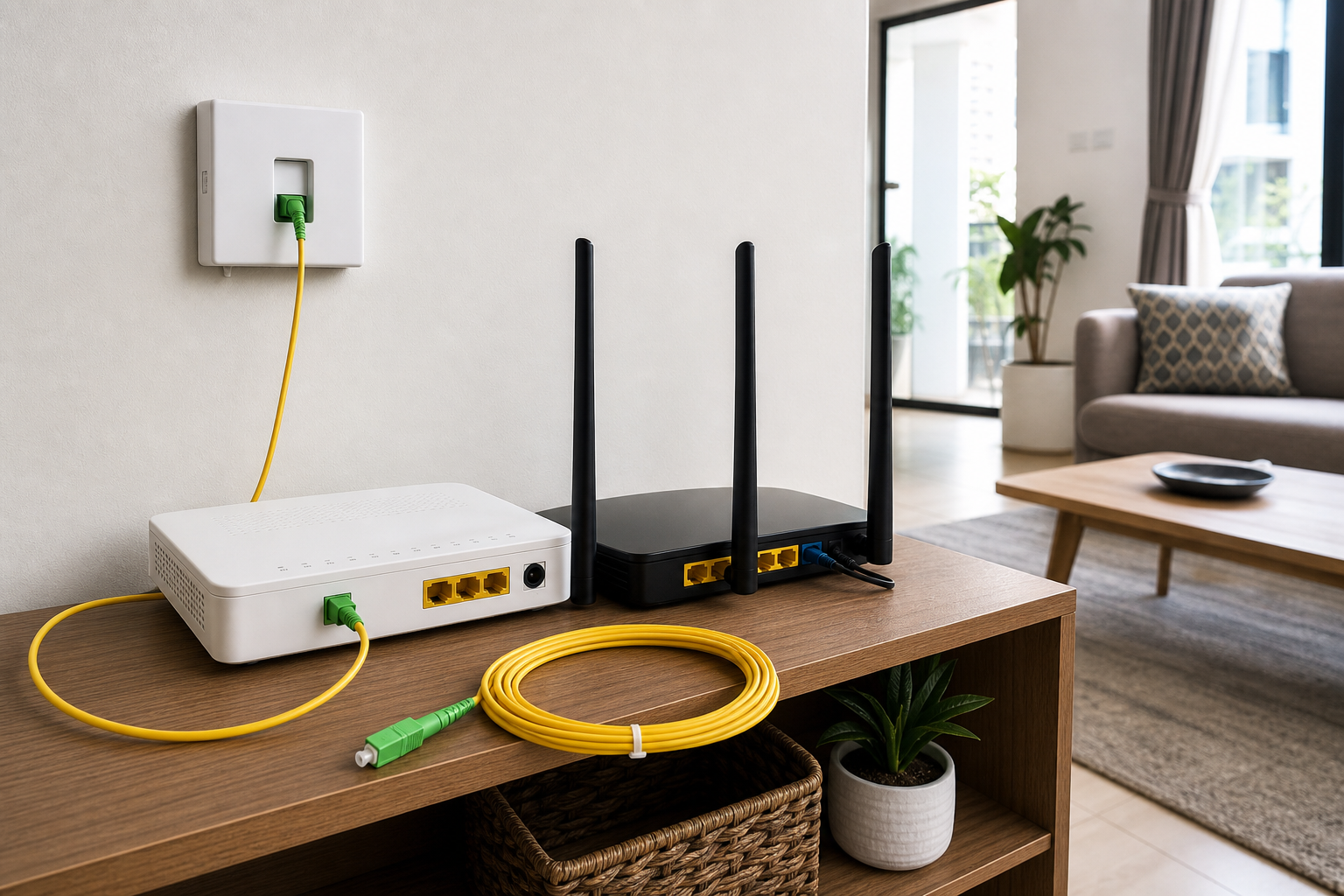
The idea is simple: data travels as light through a thin glass fiber strand from the provider network to your premises. At home, the fiber enters through a wall outlet, fiber termination box, or small distribution point, then connects to an Optical Network Terminal, usually called an ONT. The ONT converts the optical signal into Ethernet, which is then shared through a Wi-Fi router or wired network. When installed well, Fiber to the Home Kenya gives users lower latency, better reliability, higher bandwidth, and fewer peak-hour problems than many older connection types.
This guide explains how FTTH works in Kenya, what equipment is used, how installation is planned, what affects pricing, how to choose a provider, and what mistakes to avoid. For related planning, read our guides on Fiber Optic Internet Kenya, Fiber Optic Cable Kenya, Single Mode Fiber Cable Kenya, Fiber Optic Technicians Kenya, Fiber Optic Network Installation Kenya, and booking a fiber installation survey. For external connectivity comparisons, households and businesses can also review satellite internet installation options, Amazon Internet Kenya, and network hardware planning from Mikrotik Kenya.

What does Fiber to the Home mean?
Fiber to the Home means the internet provider runs fiber optic cable all the way to the customer premises rather than stopping far away at a street cabinet, mobile tower, or exchange. In a proper FTTH setup, the final connection into the home is optical fiber. This matters because the last part of an internet connection is often where performance is lost. If the last segment uses poor copper wiring, congested wireless, or weak mobile signal, the user may not enjoy the full benefit of the provider's backbone.
With FTTH, the optical signal reaches the building and terminates at an ONT or similar device. From there, the connection can be distributed through Wi-Fi, Ethernet, mesh access points, switches, or structured cabling. The fiber itself is not the same as Wi-Fi. Fiber brings the internet into the home; Wi-Fi distributes it wirelessly to phones, laptops, smart TVs, cameras, and tablets. A fast FTTH package can still feel slow if the router is poorly placed or the Wi-Fi network is weak.
In Kenya, FTTH is common in many urban and peri-urban areas, especially in Nairobi, Kiambu, Machakos, Mombasa, Kisumu, Nakuru, Eldoret, Thika, Kitengela, Ruaka, Ruiru, Syokimau, Athi River, and other growing residential zones. Coverage still varies by estate, road, apartment block, landlord approval, and provider infrastructure. Two homes in the same town can have different installation timelines depending on how close they are to the nearest fiber distribution point.
Why FTTH matters for Kenyan homes
Kenyan households now use the internet for more than casual browsing. Remote work, online classes, cloud documents, streaming, online gaming, smart TVs, mobile money dashboards, e-commerce, video calls, home CCTV, and home businesses all need stable connectivity. Mobile data can be convenient, but it is often capped and can fluctuate with network congestion. Wireless broadband can be useful, but it may depend on signal strength and line of sight. FTTH gives the home a fixed high-capacity link designed for everyday heavy use.
Low latency is one major advantage. Latency affects video calls, gaming, VoIP, remote desktops, and real-time cloud applications. A connection with high download speed but poor latency can still feel frustrating during meetings or gaming sessions. Fiber usually performs well because light travels efficiently through the cable and the link is less exposed to radio interference. This is why many home workers, students, gamers, and small business owners prefer fiber where it is available.
Reliability is another advantage. Fiber optic cable is not affected by electrical noise in the same way copper cable can be. It can support longer distances and higher capacity when installed correctly. For estates, apartments, and multi-room homes, fiber can also be part of a wider network design that includes access points, switches, CCTV links, and backup internet. The result is not just a faster package, but a more dependable home network.
How FTTH installation works in Kenya
A typical FTTH installation starts with a coverage check. The provider or installer confirms whether fiber infrastructure is available near the premises. If coverage exists, a technician schedules a visit, checks the route from the nearest distribution point to the house, and decides how the drop cable will enter the building. The route may be aerial from a pole, through an existing duct, along a wall, through conduit, or from an apartment building riser.
The technician then pulls or clips the fiber drop cable to the home. Good routing avoids sharp bends, exposed edges, hot areas, moving doors, and places where future drilling or renovation may damage the cable. At the entry point, the fiber may terminate in a small wall outlet or termination box. From there, a short patch cord connects to the ONT. The ONT then connects to a router using Ethernet, unless the ONT and router are combined in one device.
After installation, the technician should test the optical signal, activate the service, confirm internet access, and check whether Wi-Fi is usable in the main rooms. For larger homes, apartments with thick walls, maisonettes, or houses with outdoor areas, the standard router may not cover everything. In those cases, mesh Wi-Fi, wired access points, or better router placement may be needed. The fiber package can be excellent while the Wi-Fi design still needs improvement.

FTTH equipment used at home
The most important FTTH device is the Optical Network Terminal. The ONT receives the optical signal from the provider and converts it into a usable Ethernet connection. Some ONTs include Wi-Fi, while others are simple bridge-style devices that connect to a separate router. Separate routers are often better for larger homes or users who need stronger Wi-Fi, guest networks, parental controls, VPNs, bandwidth management, or failover.
The fiber wall outlet or termination box protects the delicate connection point where the drop cable enters the premises. It keeps the fiber organized and reduces the risk of accidental pulling. The patch cord is the short cable between the wall outlet and ONT. It should not be bent tightly, stepped on, pulled, or repeatedly unplugged without proper cleaning. Dust and scratches on fiber connectors can create signal loss and intermittent faults.
Other equipment may include power adapters, Ethernet cables, switches, access points, UPS units, and cable trunking. If the home has CCTV, smart devices, or a home office, it may also need a small network switch. If uptime is important, a UPS can keep the ONT and router running during short power interruptions. Fiber internet still needs powered equipment inside the home; if the ONT or router loses power, the connection will go down even if the fiber line is healthy.
FTTH vs mobile data, wireless, and satellite
FTTH is usually the strongest choice where it is available and properly supported. It offers stable speeds, low latency, and predictable monthly usage. Mobile data is excellent for mobility and backup, but it can become expensive for heavy streaming, downloads, online classes, and work-from-home use. Speeds may also fluctuate depending on tower congestion, indoor signal strength, device capability, and network coverage.
Fixed wireless can work well where fiber is not available, especially for homes with clear line of sight to a provider tower. However, it can be affected by obstruction, interference, equipment alignment, and shared capacity. Satellite internet is valuable for rural homes, farms, lodges, and remote properties where fiber has not reached. It can be a practical backup or primary link in underserved areas. Still, where reliable FTTH is already available, fiber often gives better value per Mbps and lower latency for daily home use.
The best connection depends on location and need. A home in a serviced estate may choose FTTH as the main link and mobile or satellite as backup. A remote farm may use satellite first and later add fiber when coverage arrives. A home office that cannot afford downtime may use a dual-WAN router to fail over from fiber to mobile or satellite automatically. Connectivity planning should match the risk of downtime, not only the advertised speed.
What affects FTTH prices in Kenya?
FTTH pricing depends on provider, speed package, location, installation promotion, equipment, and whether the plan is residential or business-grade. Entry packages are usually priced for normal home browsing, streaming, and light work. Mid-tier packages suit families, remote workers, and households with several devices. Higher-speed packages suit heavy users, home businesses, content creators, gamers, and homes with multiple 4K streams, cloud backups, or many connected devices.
Installation costs can also vary. Some providers offer free installation during promotions if the home is close to existing infrastructure. Others charge for extra cable length, difficult routing, apartment permissions, trenching, conduit, router upgrades, or non-standard work. A cheap monthly package may not be the best choice if installation quality is poor or support is slow. The total value includes speed, reliability, equipment quality, fair usage policy, support, and upgrade flexibility.
Before paying, ask whether the package is unlimited, whether speeds are symmetrical or mostly download-focused, whether the router is included, whether installation is free, how long activation takes, what happens during outages, and whether the provider supports your specific estate or apartment block. If you run a business from home, ask whether the plan allows static IPs, public IPs, or business support. Not every residential package is suitable for business-critical use.
Choosing the right FTTH package
The right package depends on users, devices, and applications. A small household that mainly browses, watches videos, and uses messaging may not need the highest speed tier. A family with remote workers, online learners, smart TVs, gaming consoles, tablets, CCTV, and cloud backups needs more capacity. Upload speed matters for video calls, cloud backups, content uploads, remote work, and CCTV viewing. Do not choose based only on download speed.
Latency and consistency matter as much as speed. A stable 30 Mbps connection can feel better than an unstable higher-speed connection during meetings. Router quality also matters. If the router is weak, placed in a corner, hidden in a cabinet, or blocked by thick walls, users may blame the fiber package when the real issue is Wi-Fi coverage. For larger homes, access points connected by Ethernet are often more reliable than relying on one router.
For home offices, consider redundancy. If your job, business, online shop, or customer support depends on the connection, a backup link may be worth the cost. This can be mobile data, fixed wireless, or satellite depending on location. A router that supports failover can automatically switch when fiber is down. The backup does not need to match the full fiber speed; it only needs to keep critical work online during outages.

Wi-Fi design after FTTH installation
Many FTTH complaints are actually Wi-Fi design problems. Fiber may be delivering full speed to the ONT, but users experience slow speeds in bedrooms, upstairs rooms, balconies, detached servant quarters, or home offices. Thick concrete walls, metal doors, mirrors, appliances, neighboring Wi-Fi networks, and poor router placement can all weaken wireless coverage. The first step is to test speed near the router using Ethernet or strong Wi-Fi, then compare it with weak rooms.
A good home network places the router in a central, open location where possible. If the fiber entry point is in a poor location, the installer can sometimes route Ethernet from the ONT to a better router position. For larger homes, mesh systems can help, but wired access points are usually stronger where cabling is practical. The best setup depends on room layout, wall thickness, number of users, and whether the home needs outdoor or upstairs coverage.
Security should not be ignored. Change default Wi-Fi names and passwords, use strong encryption, separate guest Wi-Fi where possible, and keep router firmware updated. If CCTV or smart devices are connected, avoid exposing them carelessly to the internet. A home network is now part of daily life and should be treated with the same seriousness as locks, power, and security systems.
Common FTTH installation mistakes
- Installing the ONT or router in the easiest location rather than the best location for Wi-Fi coverage.
- Bending the fiber patch cord tightly behind furniture or cabinets.
- Leaving the fiber cable exposed where children, pets, cleaning, or furniture movement can damage it.
- Using a weak router for a large home and blaming the fiber package for poor Wi-Fi.
- Ignoring power backup for the ONT and router when outages affect work or security.
- Choosing a package only by price without checking support, coverage, fair usage, and upgrade options.
- Failing to label or document the fiber entry point and equipment location in apartments or rented homes.
- Using home fiber for business-critical operations without backup or a support plan.
Most of these mistakes are avoidable with a short survey and practical planning. A clean FTTH installation should protect the fiber route, place equipment sensibly, test the connection, and consider how users actually move around the home. If the home is large or the internet is mission-critical, the installation should include Wi-Fi planning and backup discussions from the beginning.
Maintenance and troubleshooting
FTTH maintenance is usually simple. Keep the ONT and router powered, ventilated, and protected from water, dust, and accidental impact. Do not pull or sharply bend the yellow patch cord. Avoid repeatedly unplugging the fiber connector. If a connector must be handled, it should be cleaned with proper fiber cleaning tools. Never look into a live fiber connector, because optical light may be invisible and unsafe.
If the internet goes down, check power first. Confirm the ONT and router are on, then check whether the optical or LOS indicator suggests a fiber signal issue. Restarting the router can solve some local problems, but repeated outages should be reported to the provider. If Wi-Fi is slow but Ethernet is fast, the issue is likely local Wi-Fi. If both Ethernet and Wi-Fi are down and the ONT shows loss of signal, the problem may be a provider outage, damaged drop cable, dirty connector, or cut fiber.
Keep provider contacts, account details, and installation notes available. In apartments or shared buildings, know whether the fiber passes through a riser, ceiling, or shared cabinet. During renovations, painting, drilling, roofing, or furniture movement, protect the fiber route. Many avoidable outages happen when a live fiber cable is cut or crushed during unrelated home maintenance.
FAQ: Fiber to the Home Kenya
Is FTTH better than 4G or 5G internet?
FTTH is usually better for stable home use where it is available because it offers lower latency, more predictable speeds, and better support for heavy daily usage. 4G and 5G are useful for mobility and backup, but speeds can fluctuate with signal and congestion.
What equipment do I need for Fiber to the Home?
You normally need a fiber drop cable, wall outlet or termination box, ONT, router, power adapter, and Ethernet cable. Larger homes may also need switches, access points, mesh Wi-Fi, cable trunking, or a UPS.
Can FTTH support CCTV at home?
Yes. FTTH can support remote CCTV viewing if the package has enough upload speed and the router is configured securely. Fiber cabling can also be used inside a property to connect distant camera points where copper Ethernet is not practical.
Why is my fiber internet slow on Wi-Fi?
The fiber link may be healthy while Wi-Fi is weak. Common causes include poor router placement, thick walls, old devices, interference, too many users, weak router hardware, or lack of access points in larger homes.
How long does FTTH installation take in Kenya?
If fiber infrastructure is already nearby and permissions are clear, installation can be quick. If the route needs extra cable, duct work, landlord approval, trenching, or provider expansion, it may take longer. A site survey gives the most realistic timeline.
Final advice
Fiber to the Home Kenya is one of the best connectivity choices for households that need stable internet for work, learning, streaming, gaming, home business, smart devices, and CCTV. The best results come from more than choosing a fast package. You need clean cable routing, correct ONT placement, a good router, proper Wi-Fi design, power protection, realistic speed selection, and backup planning where downtime matters.
If you are moving into a new home, upgrading from mobile data, setting up a home office, improving weak Wi-Fi after fiber installation, or planning internet for an apartment or estate, start with a proper review. You can book a Fiber to the Home installation survey in Kenya so the route, equipment, package, Wi-Fi coverage, and backup needs are assessed before installation begins.