Fiber Optic Internet Kenya is one of the most important connectivity topics for homes, offices, schools, hospitals, hotels, apartment blocks, warehouses, factories, CCTV networks, internet service providers, and growing digital businesses. As more Kenyan users move their work, learning, payments, communication, entertainment, and security systems online, the quality of the internet connection is no longer a small technical detail. It directly affects productivity, customer service, video calls, cloud systems, online classes, streaming, point-of-sale systems, CCTV access, and the ability to scale.
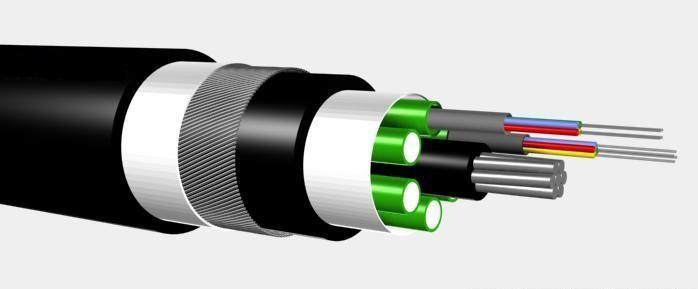
Fibre optic internet uses strands of glass or plastic to carry data as light. That is different from copper-based connections, which move electrical signals, and different from wireless connections, which depend on radio coverage, congestion, signal strength, weather exposure, and tower capacity. Fibre can deliver high bandwidth, low latency, stable performance, and better long-distance reliability when the cable route, termination, provider link, router, and internal network are designed correctly.
This guide explains how fibre optic internet works in Kenya, where it is useful, what to check before installation, how to compare providers, how much speed you may need, why router and Wi-Fi design matter, and how to avoid common mistakes. It also includes internal resources such as our Fiber Optic Cable Kenya guide, network installation services, installation survey booking page, and backup internet options in Kenya.

What is fiber optic internet?
Fiber optic internet is broadband delivered through optical fibre cable. A provider runs fibre through backbone routes, distribution points, cabinets, poles, ducts, or building entry points. The final connection may reach a home, office, school, estate, data room, or business premises through a fibre drop cable. At the customer site, the fibre normally connects to an optical network terminal, router, switch, or other network equipment that converts the fibre link into usable wired and wireless internet.
The main strength of fibre is capacity. Fibre can move large amounts of data quickly over long distances with less signal loss than copper. That is why it is used for national backbones, undersea cables, mobile tower connections, data centres, business links, estate networks, and high-speed home broadband. The same technology that connects cities and providers can also connect an office floor, a school campus, a hotel block, or CCTV points across a compound.
For Kenyan users, fibre optic internet usually means faster downloads, smoother video calls, better upload performance, lower delay, and more stable service than many older broadband options. However, the final experience still depends on the provider, service package, installation quality, router, Wi-Fi coverage, contention, power backup, and the condition of the internal network. A fibre connection is only as good as the full path from provider equipment to the device being used.
Why fibre internet is growing in Kenya
Kenya's digital economy has created heavy demand for stable internet. Homes need remote work, online classes, streaming, gaming, smart TVs, phones, tablets, and cloud backups. Businesses need email, customer support systems, cloud accounting, ERP platforms, CRM tools, payment systems, video meetings, security cameras, and shared files. Schools need computer labs, teacher resources, learning portals, and administration systems. Hotels and apartments need reliable internet for residents, guests, staff, and smart systems.
Mobile data can be convenient, but it may be inconsistent indoors or during busy hours. Wireless links can work well in some locations, but they can be affected by line of sight, radio interference, tower congestion, equipment alignment, and weather. Copper connections can be limited by distance and ageing infrastructure. Fibre solves many of these problems by giving a cleaner, high-capacity physical path for internet traffic.
Fibre also supports future growth. A home that starts with basic browsing may later add 4K streaming, gaming, remote work, and smart devices. A small office may later add more staff, cloud software, IP phones, CCTV, and guest Wi-Fi. A building owner may later need to serve many tenants. Installing proper fibre routes and network cabinets can reduce the cost and disruption of upgrades.
Where fibre optic internet is available
Fibre availability in Kenya varies by town, neighbourhood, estate, building, road, and provider. Nairobi has the broadest coverage in many commercial and residential areas, but availability can still change from one street to the next. Mombasa, Kisumu, Nakuru, Eldoret, Thika, Kiambu, Machakos, Naivasha, Nyeri, and other towns have expanding fibre footprints, especially in dense residential areas, business centres, institutions, and estates.
Before choosing a package, confirm whether the provider has active infrastructure near your location. Do not rely only on general adverts. Ask for a coverage check using your estate name, building name, road, plot, nearest landmark, or GPS pin. In apartments and commercial buildings, also ask whether the provider already has permission to enter the building, use risers, mount equipment, or run fibre through existing ducts.
If fibre is not available at the exact site, you may still have options. A provider may extend fibre if there is enough demand, a business may order a dedicated link, or a property developer may install internal fibre infrastructure in advance. For remote sites, farms, lodges, field offices, and areas waiting for fibre rollout, services from Amazon Internet Kenya or specialist teams such as Satellite Internet Installers can provide interim or backup connectivity.
Home fibre vs business fibre
Home fibre internet is usually designed for residential use. It may offer high download speeds at an affordable monthly price, but it is often shared across many users in the provider network. That is acceptable for normal browsing, streaming, online classes, social media, and remote work for a small household. However, residential packages may have limited support commitments, variable upload performance, and less formal uptime protection.
Business fibre is designed for organisations that need more predictable performance, stronger support, static IP options, better upload speeds, service-level commitments, or dedicated capacity. A small office, clinic, school, hotel, cyber cafe, warehouse, factory, or company relying on cloud systems may need a business-grade package even if a home package looks cheaper. The cost difference can be justified when downtime affects revenue, customer service, or operations.
When comparing packages, look beyond the advertised download speed. Ask about upload speed, contention ratio, fair usage policy, router quality, installation fee, support hours, repair timelines, static IP availability, public IP options, contract terms, and whether the provider can support your internal network. A fast package on paper may disappoint if the router is weak, Wi-Fi coverage is poor, or the support team cannot respond when your business link fails.

How much fibre speed do you need?
The right speed depends on users, devices, applications, and peak usage. A small household with browsing, social media, online classes, and streaming may be comfortable on a modest package if the router is well placed. A household with multiple 4K streams, gamers, remote workers, smart TVs, cloud backups, and many phones may need a higher package. Upload speed matters for video calls, cloud backup, content creation, CCTV uploads, and sending large files.
For businesses, think in terms of workflow rather than a single speed number. A reception desk, M-Pesa terminal, email user, and browser may not need much bandwidth individually. A design team sending large files, a school computer lab, a hotel guest Wi-Fi network, a CCTV system, and many video calls can consume much more. If many users share one link, the router and switches must manage the traffic fairly so one heavy user does not slow everyone else.
Latency also matters. Latency is the response delay between your device and an online service. Fibre usually performs well here, especially compared with older satellite and congested wireless links. Low latency helps video calls, gaming, remote desktop, cloud systems, and VoIP. For a deeper explanation of delay and real-time applications, read our internal guide on internet latency in Kenya.
Installation: what should happen on site?
A good fibre installation starts with a survey. The installer should confirm the incoming route, fibre entry point, router position, power socket, cable protection, building access, landlord approval, and where users actually need internet. In a home, this may mean choosing a central router position and avoiding corners or cabinets. In an office, it may mean connecting the fibre to a network cabinet, firewall, switch, and access points. In a school or hotel, it may require a structured design across multiple blocks or floors.
The installer should protect the cable route. Fibre should not be sharply bent, crushed under doors, pulled across unsafe roof edges, or left loose where people can trip over it. Outdoor routes should be protected from weather, rodents, vandalism, and construction damage. Indoor routes should use neat trunking, clips, conduits, ceiling pathways, or cabinets where appropriate. The final work should look tidy and be easy to maintain.
After installation, the provider or installer should activate the service and test it. Testing should include speed near the router, upload performance, latency, Wi-Fi coverage in important rooms, and real applications such as video calls, streaming, payment systems, cloud software, and CCTV viewing. For larger internal fibre projects, testing should also include optical power readings or OTDR reports as explained in our fiber optic cable installation guide.
Router and Wi-Fi design matter
Many people blame the provider when the real problem is the local network. Fibre may enter the building at high speed, but weak Wi-Fi can make the connection feel slow. Thick concrete walls, long corridors, metal doors, cabinets, mirrors, floors, and distance can reduce wireless performance. A router hidden behind a TV, inside a cabinet, under a desk, or in a far corner may not serve the whole house or office well.
For small homes, a well-placed router may be enough. For maisonettes, apartments with thick walls, offices, clinics, schools, hotels, and warehouses, you may need mesh Wi-Fi or proper access points connected by Ethernet or fibre. Business sites should separate staff Wi-Fi, guest Wi-Fi, CCTV, payment systems, and administration computers where possible. That requires better routers and switches than the basic device supplied with many residential packages.
Network equipment should match the fibre package. If you pay for a high-speed link but use an old router with weak Wi-Fi, old Fast Ethernet ports, or poor processor capacity, you will not enjoy the full service. For routing, switching, and managed networks, suppliers such as Mikrotik Kenya can be useful when planning business-grade equipment, bandwidth controls, VLANs, and multi-WAN backup.

Fibre internet for apartments and estates
Apartments and gated estates need more planning than single homes. The provider may need to bring fibre to a central location, then distribute service to many units. Building managers must think about risers, ducts, equipment rooms, power, security, labelling, access control, and future tenants. Poor planning can lead to messy cables, repeated drilling, damaged fibre, and conflict between providers, caretakers, and residents.
Property owners should consider fibre-ready infrastructure during construction or renovation. Dedicated conduits, network rooms, pull boxes, risers, and labelled routes make it easier for providers to connect customers neatly. Tenants benefit from faster activation and fewer visible cables. The property also becomes more attractive to residents and businesses that depend on stable connectivity.
For existing buildings, a survey can identify whether ducts are usable, whether old cables should be cleaned up, where provider equipment can sit, and how to avoid unsafe or untidy routes. A building fibre plan should leave room for multiple providers where possible, because residents may want choice and redundancy.
Fibre internet for business continuity
Even a good fibre connection can fail due to cable cuts, power problems, provider outages, road works, building maintenance, router faults, or account issues. Businesses should plan for continuity. At minimum, use a UPS for the router, switches, and access points. For critical sites, add a backup connection using another fibre provider, fixed wireless, 4G/5G, or satellite. The backup should be tested before an outage, not discovered during one.
Backup planning depends on risk. A small office may only need a mobile backup router for email and payments. A hospital, hotel, factory, school, or busy shop may need automatic failover, load balancing, public IP planning, CCTV priority, and separate guest traffic. The router should know which applications are most important so streaming or guest Wi-Fi does not consume all backup capacity during an outage.
Power is part of internet reliability. If the router has no backup power, the connection goes down even when the provider network is working. Add surge protection and a UPS, especially in areas with voltage changes or frequent outages. For larger sites, keep the internet cabinet on protected power and document which sockets support network equipment.
Fibre optic internet prices in Kenya
Prices vary by provider, location, package speed, installation cost, router, contract type, and whether the service is residential or business-grade. Residential fibre is usually cheaper and easier to order in covered areas. Business fibre costs more because it may include better support, dedicated capacity, static IP options, managed routers, or service-level agreements. Dedicated internet access is usually the most expensive but provides more predictable performance for organisations that cannot tolerate downtime or heavy contention.
When comparing fibre prices, calculate the total cost. Include installation fee, router fee, monthly subscription, VAT if applicable, relocation charges, extra cabling, access points, switches, static IP fees, and support terms. Ask whether the advertised speed is symmetrical or whether upload speed is lower than download speed. For businesses that send backups, CCTV footage, design files, or live streams, upload speed may be as important as download speed.
Do not compare only the cheapest package. A low monthly cost may be fine for a light home user, but it may not be suitable for a business that depends on online payments, cloud systems, or customer support. The best value is the package that delivers enough speed, stable support, clean installation, and a network design that fits your site.
Common mistakes to avoid
- Ordering fibre without checking exact coverage at the building or estate.
- Choosing a package only by download speed and ignoring upload speed, latency, support, and contention.
- Placing the router in a poor location and blaming fibre for weak Wi-Fi.
- Using old switches, routers, or access points that cannot handle the purchased speed.
- Letting fibre cable run loose, sharply bent, exposed, or undocumented.
- Running a business on one connection without backup or UPS protection.
- Mixing guest Wi-Fi, staff systems, CCTV, and payment devices on one unmanaged network.
- Accepting an installation without testing real applications in the rooms where users work.
Most of these mistakes are easy to prevent with a proper survey. The provider link, router location, Wi-Fi design, internal cabling, power backup, and user needs should be considered together. Fibre is strong infrastructure, but poor site design can hide its advantages.
How to choose a fibre internet provider
Start with coverage, then compare performance and support. Ask whether the provider has active fibre near your exact site. Ask how long installation takes, what router is supplied, what speeds are available, whether upload speed is guaranteed, and how support is handled. Businesses should ask about response times, escalation contacts, static IPs, public IPs, service-level agreements, and whether the provider can support firewall or router integration.
Read the terms before paying. Check contract length, relocation policy, cancellation rules, fair usage terms, installation ownership, and what happens if the service does not work well after installation. If the link supports an office, school, hotel, shop, or clinic, keep account details and support contacts documented so future staff can manage renewals and troubleshooting.
Also consider whether the provider understands your site. A home installation is different from a hotel, apartment block, school, hospital, warehouse, or factory. For complex locations, a provider or installer should be able to talk about internal distribution, access points, switches, fibre routes, backup internet, and power protection, not only monthly package prices.
FAQ: Fiber Optic Internet Kenya
Is fibre optic internet better than 4G or 5G?
Fibre is usually more stable for fixed homes and businesses because it uses a physical cable with high capacity and low latency. 4G and 5G are useful for mobility and backup, but performance can vary with coverage, congestion, building materials, and signal strength.
Can fibre internet support CCTV?
Yes. Fibre internet can support remote CCTV viewing, and fibre cabling can also connect cameras across long distances inside a property. The design should include enough upload speed, router capacity, secure access, and proper internal cabling.
Why is my fibre internet slow on Wi-Fi?
The fibre link may be working correctly while Wi-Fi is weak. Common causes include poor router placement, thick walls, old devices, interference, too many users, low-quality routers, and lack of access points in large spaces.
Do businesses need dedicated fibre?
Not always. Some small businesses can use shared business fibre. Dedicated fibre is better when uptime, predictable speed, upload performance, public IPs, and support commitments are critical.
Can I use fibre and satellite internet together?
Yes. Some businesses use fibre as the primary connection and satellite as backup, especially where outages are costly or where a remote branch has no reliable fibre coverage. A proper router can manage failover between the two links.
Final advice
Fiber Optic Internet Kenya is the right choice for many users who need fast, stable, low-latency connectivity. The best result comes from matching the package to real usage, installing the fibre route neatly, placing the router correctly, designing Wi-Fi properly, protecting power, and planning backup where downtime matters. Fibre can transform a home, office, school, estate, hotel, or business site, but only when the full network is planned around how people actually use the internet.
If you are choosing fibre for a new site, upgrading a slow connection, connecting multiple buildings, or planning business backup, start with a proper survey. You can book a fibre internet installation survey in Kenya so the route, equipment, speed, Wi-Fi coverage, backup options, and support needs are reviewed before installation begins.