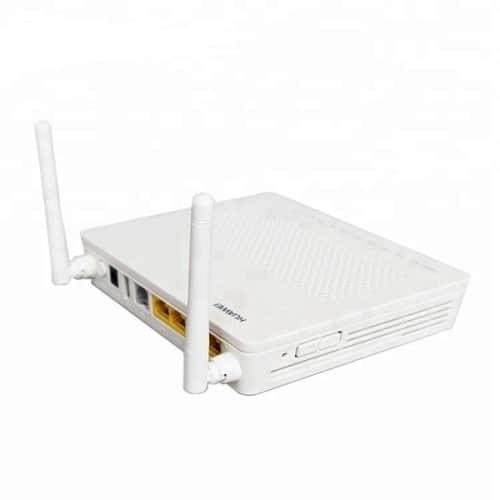
ONT and ONU Devices Price in Kenya
Huawei HG8546M XPON GPON/EPON Router in Kenya
KSh 1,600.00
1 available
Continue shoppingHuawei HG8546M XPON GPON/EPON Router in Kenya
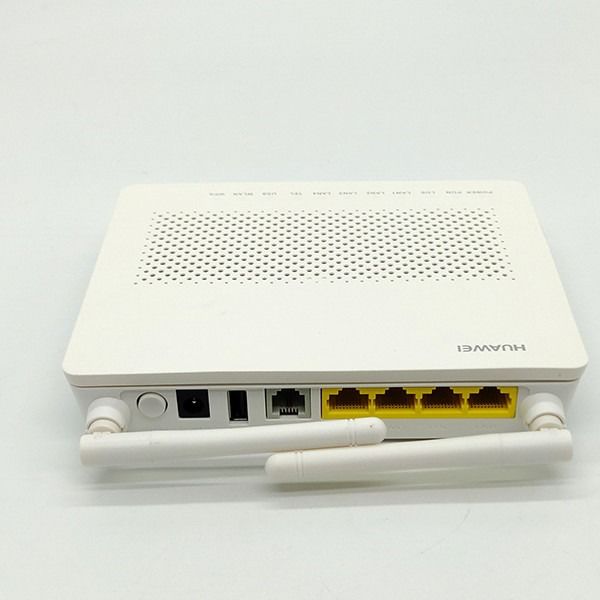
The Huawei HG8546M XPON GPON/EPON Router is a popular fibre subscriber terminal used in FTTH, FTTB, FTTO, residential, office and ISP networks. It combines the functions of an optical network unit and a basic Wi-Fi router, allowing one device to terminate the fibre connection and provide Ethernet, wireless Internet and telephone connectivity.
Common HG8546M configurations provide 1 Gigabit Ethernet port, 3 Fast Ethernet ports, 1 POTS telephone port, 1 USB port and 2.4 GHz Wi-Fi. Kenyan suppliers currently list the unit as an XPON GPON/EPON ONU suitable for fibre-to-the-home and fibre-to-the-office deployments.
One important purchasing consideration is that the HG8546M name is used on different hardware and firmware variants in the market. Some units are genuine Huawei GPON ONTs, while many units sold locally as HG8546M XPON are OEM variants designed to operate on both GPON and EPON networks. The exact PON mode, firmware and OLT compatibility should therefore be verified before a bulk ISP rollout.
Huawei HG8546M Key Specifications
| Specification | Typical HG8546M XPON Configuration |
|---|---|
| Product Name | Huawei HG8546M XPON GPON/EPON Router |
| Product Type | ONU / ONT / FTTH Router |
| PON Technology | GPON / EPON on XPON variants |
| Ethernet Ports | 4 |
| Gigabit Ethernet | 1 × GE |
| Fast Ethernet | 3 × FE |
| Ethernet Connector | RJ45 |
| Wi-Fi | 2.4 GHz |
| Wireless Standard | IEEE 802.11b/g/n |
| Wireless Antennas | Commonly 2 external antennas |
| POTS Port | 1 × RJ11 |
| USB Port | 1 |
| Router Mode | Supported on common variants |
| Bridge Mode | Supported on common variants |
| GPON Downstream Rate | Up to approx. 2.488 Gbps |
| GPON Upstream Rate | Up to approx. 1.244 Gbps |
| EPON Line Rate | Approx. 1.25 Gbps symmetrical |
| VLAN Support | Yes |
| OMCI/OAM Management | Depends on PON mode and firmware |
| Power Supply | Commonly 12 V DC |
| Application | FTTH, Home, Office, ISP, SOHO |
A current Kenyan HG8546M listing specifies 1GE + 3FE + 1 POTS + 1 USB + 2.4 GHz Wi-Fi, while other market variants may use four Fast Ethernet interfaces instead.
What Is the Huawei HG8546M?
The Huawei HG8546M is a subscriber-side optical network terminal installed between an ISP's passive optical fibre network and the customer's local network.
A typical connection looks like:
Internet → Router/Core Network → OLT → PLC Splitter → FTTH Cable → HG8546M → Customer Devices
The HG8546M receives the optical signal from the OLT and converts it into:
Ethernet
Wi-Fi
Voice
Local network connectivity
This makes it more integrated than a simple bridge ONU such as the HG8310M.
XPON GPON/EPON Compatibility
One of the main reasons HG8546M XPON variants are popular with local ISPs is their ability to operate on compatible GPON or EPON infrastructure.
| Network Type | HG8546M XPON Variant |
|---|---|
| GPON OLT | Supported where compatible |
| EPON OLT | Supported where compatible |
| XPON Auto Detection | Common on XPON-labelled units |
| Huawei OLT | Compatibility depends on firmware |
| VSOL OLT | Verify before deployment |
| HIOSO OLT | Verify before deployment |
| Other OLT Brands | Test interoperability |
Current Kenyan XPON suppliers describe the HG8546M as supporting GPON and EPON, but because hardware and firmware vary, testing against the intended OLT remains essential.
GPON vs EPON Operation
| Feature | GPON Mode | EPON Mode |
|---|---|---|
| Standard Family | ITU-T G.984 | IEEE 802.3ah |
| Typical Downstream | 2.488 Gbps | 1.25 Gbps |
| Typical Upstream | 1.244 Gbps | 1.25 Gbps |
| OLT Required | GPON | EPON |
| Subscriber Management | OMCI | OAM |
| HG8546M XPON Variant | Supported where compatible | Supported where compatible |
The actual Internet speed delivered to the user depends on the ISP package, Ethernet port used, Wi-Fi conditions and OLT configuration rather than the PON line rate alone.
1GE + 3FE Ethernet Ports
A common HG8546M configuration provides:
| Port | Speed |
|---|---|
| LAN 1 | 1 Gbps |
| LAN 2 | 100 Mbps |
| LAN 3 | 100 Mbps |
| LAN 4 | 100 Mbps |
This allows several wired devices to connect directly to the ONU.
The Gigabit port is particularly useful for:
High-speed Internet packages
External routers
Smart TVs
PCs
Network switches
Small office networks
Current Kenyan HG8546M listings identify the common port combination as 1 × 10/100/1000BASE-T plus 3 × 10/100BASE-T.
Why the Gigabit Port Matters

A Fast Ethernet interface is limited to a nominal 100 Mbps link.
Therefore, if a customer subscribes to a package above 100 Mbps, connecting through one of the FE interfaces can create a bottleneck.
| Subscriber Package | Preferred Port |
|---|---|
| 20 Mbps | FE or GE |
| 50 Mbps | FE or GE |
| 100 Mbps | GE Preferred |
| 150 Mbps | GE Required |
| 200 Mbps+ | GE Required |
For higher-speed packages, the Gigabit Ethernet interface should normally be used.
Built-In 2.4 GHz Wi-Fi
The HG8546M commonly includes 2.4 GHz Wi-Fi using IEEE 802.11b/g/n.
This allows devices such as:
Smartphones
Laptops
Smart TVs
Tablets
CCTV cameras
IoT devices
to connect wirelessly without requiring a separate router.
Dual External Antennas
Many HG8546M XPON units use two external Wi-Fi antennas.
Current Kenyan listings specify a 2×2 antenna configuration on common versions.
The external antennas can improve coverage compared with very small internal-antenna ONUs, although actual Wi-Fi range depends on walls, interference, antenna gain and installation location.
Is Huawei HG8546M Dual Band?
The common HG8546M XPON version is a 2.4 GHz-only Wi-Fi ONU, not a modern dual-band 2.4/5 GHz router.
| Feature | HG8546M |
|---|---|
| 2.4 GHz | Yes |
| 5 GHz | No on common version |
| Wi-Fi 5 AC | No |
| Wi-Fi 6 AX | No |
For high-speed FTTH packages where Wi-Fi performance matters, an ISP may use the HG8546M in bridge mode with a separate dual-band or Wi-Fi 6 router.
POTS Telephone Port
The HG8546M includes a POTS/RJ11 telephone interface on common configurations.
This allows the device to support voice services where the ISP's OLT and VoIP platform are properly configured.
A single fibre connection can therefore provide:
Internet + Wi-Fi + Telephone
This is useful for:
Offices
Homes
Hotels
Institutions
Small businesses
USB Port
The HG8546M commonly provides one USB interface.
The exact supported USB functions depend on firmware. Possible functions on compatible variants can include storage or service-management applications.
Bridge Mode
The HG8546M can be used in bridge mode on compatible firmware.
A common ISP architecture is:
OLT → HG8546M → MikroTik / TP-Link / Ubiquiti Router
In this configuration, the HG8546M handles the optical PON connection while the external router handles the customer's network.
Bridge mode is useful when the operator wants:
PPPoE on an external router
Better Wi-Fi
Advanced firewalling
VLAN control
VPN
Bandwidth management
Avoidance of double NAT
Router Mode
The HG8546M can also operate as a subscriber gateway on common versions.
Router-mode functions can include:
PPPoE
DHCP
NAT
Wi-Fi
VLANs
LAN routing
Basic firewalling
This allows the HG8546M to provide a complete basic FTTH Internet connection without a separate router.
Huawei HG8546M with MikroTik
The HG8546M works well in MikroTik-based ISP networks when properly provisioned.
A typical architecture is:
Internet → MikroTik Core Router → OLT → PLC Splitter → HG8546M → Customer
Alternatively:
OLT → HG8546M Bridge → MikroTik Customer Router → Wi-Fi Devices
MikroTik can then manage:
PPPoE
DHCP
NAT
Firewall
RADIUS
Hotspot
Queues
Bandwidth packages
VPN
Subscriber billing integration
VLAN Support
VLAN configuration is important in FTTH networks because the ISP may need different VLANs for:
| VLAN | Application |
|---|---|
| Internet VLAN | Subscriber Internet |
| Management VLAN | ONU administration |
| Voice VLAN | POTS/VoIP |
| IPTV VLAN | Video |
| Business VLAN | Corporate services |
The exact VLAN menu and capabilities can vary considerably between HG8546M firmware builds, especially across the many OEM XPON units sold under this model name.
Web-Based Management
Many HG8546M variants provide a browser-based management interface used for functions such as:
Wi-Fi configuration
SSID settings
Wi-Fi password changes
WAN configuration
Bridge/router mode
VLAN settings
LAN configuration
DHCP
Device status
Optical information
Firmware-dependent diagnostics
Because firmware varies, the management address and available options should be verified from the label or ISP documentation rather than assumed.
LED Indicators
Typical HG8546M indicators include:
| Indicator | Function |
|---|---|
| POWER | Device power |
| PON | Optical registration |
| LOS | Loss of optical signal |
| LAN1–LAN4 | Ethernet connections |
| TEL | Telephone status |
| USB | USB status |
| WLAN | Wi-Fi status |
Indicator arrangements can vary by hardware version.
PON Light
The PON indicator normally shows whether the ONU has successfully established an optical connection and registered with the OLT.
If the PON light fails to stabilize, possible causes include:
ONU not registered
Wrong PON mode
Incorrect authentication
Unsupported OLT
Optical signal issue
Firmware incompatibility
LOS Light
LOS means Loss of Signal.
A red or flashing LOS indicator commonly points to an optical-layer issue, such as:
Disconnected fibre
Broken drop cable
Dirty connector
Excessive splitter loss
Bent fibre
Incorrect patch connection
Weak optical power
The optical connection should be tested before changing router configuration.
FTTH Network Architecture
| Network Stage | Equipment |
|---|---|
| Internet Feed | ISP Upstream |
| Core Router | MikroTik / Enterprise Router |
| OLT | GPON / EPON OLT |
| ODF | Fibre Termination |
| Feeder Cable | Single-Mode Fibre |
| PLC Splitter | 1x8 / 1x16 / 1x32 / 1x64 |
| Fibre Closure | Splice Protection |
| FAT Box | Subscriber Distribution |
| FTTH Drop Cable | Customer Link |
| ATB | Indoor Termination |
| ONU / ONT | Huawei HG8546M |
| Wi-Fi / LAN | Customer Devices |
Huawei HG8546M vs Huawei HG8310M
| Feature | HG8310M | HG8546M |
|---|---|---|
| Device Type | Bridge ONU | ONU Router |
| Ethernet Ports | 1GE | 1GE + 3FE common |
| Wi-Fi | No | Yes |
| POTS | No | Yes |
| USB | Usually No | Yes |
| Integrated Routing | Limited | Yes |
| Separate Router Needed | Usually | Optional |
| Best Use | Bridge Deployment | All-in-One FTTH |
The HG8310M is preferable where the ISP wants a dedicated bridge ONU, while the HG8546M is more convenient where integrated Wi-Fi and multiple LAN connections are required.
HG8546M vs 1GE XPON Bridge ONU
| Feature | 1GE Bridge ONU | HG8546M |
|---|---|---|
| Gigabit Ethernet | 1 | 1 |
| Additional LAN Ports | No | 3 FE |
| Wi-Fi | No | Yes |
| Voice Port | No | Yes |
| USB | Usually No | Yes |
| Separate Router | Required | Optional |
| Purchase Cost | Lower | Higher |
| Residential FTTH | Good | Excellent |
HG8546M vs Dual-Band XPON ONU
| Feature | HG8546M | Dual-Band XPON |
|---|---|---|
| 2.4 GHz Wi-Fi | Yes | Yes |
| 5 GHz Wi-Fi | No common version | Yes |
| Gigabit LAN | 1 | Often Multiple |
| FTTH Basic Packages | Excellent | Excellent |
| High-Speed Wi-Fi | Moderate | Better |
| Cost | Usually Lower | Usually Higher |
Huawei HG8546M Price in Kenya
Prices vary according to whether the unit is genuine Huawei, OEM XPON, refurbished, new, GPON-only or dual-mode.
Current Kenyan listings show examples around:
| Supplier Listing | Approximate Price |
|---|---|
| HG8546M EchoLife ONT | KES 3,000 excl. VAT |
| HG8546M XPON Router | KES 3,500 excl. VAT |
| Some XPON/OEM Listings | Lower depending on seller |
These are third-party market references and can change with stock and specification.
For bulk ISP orders, the exact quote should be based on quantity, firmware, PON compatibility and warranty requirements.
Watch Huawei HG8546M XPON GPON/EPON
https://youtu.be/8tRt_Joj9n8
The Huawei HG8546M XPON router is attractive for FTTH installations because it combines several customer-premises functions in one unit. Instead of installing a bridge ONU, separate Wi-Fi router and telephone gateway, compatible HG8546M variants provide optical termination, Wi-Fi, four LAN interfaces and POTS connectivity in one compact device. Current Kenyan listings describe the common configuration as 1GE + 3FE + POTS + USB + 2.4 GHz Wi-Fi.
For ISP deployments, the XPON capability can also simplify stock management because compatible units may operate on GPON or EPON networks. However, the large number of OEM HG8546M variants means interoperability should never be assumed from the model number alone. Firmware, optical mode and OLT authentication should be tested before a large order.
For customers requiring stronger wireless performance than the built-in 2.4 GHz radio can provide, the HG8546M can be placed in bridge mode and paired with a dedicated dual-band or Wi-Fi 6 router. This makes the device useful across basic residential packages as well as more advanced installations where the optical terminal and routing functions need to be separated.
Applications of Huawei HG8546M
Residential FTTH
Provides fibre termination, Wi-Fi and wired LAN connectivity in one unit.
Small ISPs
Useful as standard customer-premises equipment for FTTH subscribers.
Apartment Networks
Can be installed in individual apartments connected through a shared OLT and PLC splitter network.
Residential Estates
Suitable for estate-wide GPON or EPON deployments.
Small Offices
Four Ethernet interfaces and Wi-Fi provide basic office connectivity.
VoIP Deployments
The POTS interface can support telephone services where configured by the ISP.
MikroTik Networks
Can operate in bridge mode while MikroTik handles subscriber routing and PPPoE.
Rural ISPs
XPON variants can help reduce CPE inventory complexity where different PON technologies are used.
What to Check Before Buying HG8546M
Before purchasing units for an ISP rollout, confirm:
Whether the unit is GPON, EPON or true XPON
OLT compatibility
Firmware version
OLT authentication method
1GE + 3FE or 4FE port configuration
Bridge and router mode support
Wi-Fi specification
POTS requirement
Optical connector type
New, OEM, refurbished or genuine Huawei status
This matters because HG8546M-labelled units can differ substantially in internal hardware and firmware.
Recommended Accessories
| Accessory | Purpose |
|---|---|
| GPON OLT | Controls GPON HG8546M |
| EPON OLT | Controls compatible EPON XPON units |
| PLC Splitter | Divides PON optical signal |
| ODF | Central fibre termination |
| FAT Box | Subscriber distribution |
| Fibre Closure | Protects outdoor splices |
| FTTH Drop Cable | Customer fibre connection |
| ATB Box | Indoor termination |
| SC/APC Patch Cord | Optical connection where compatible |
| SC/APC Adapter | Fibre coupling |
| Fast Connector | Field termination |
| Fusion Splicer | Permanent fibre joints |
| PON Power Meter | GPON/EPON signal testing |
| Optical Power Meter | Optical measurements |
| OTDR | Fibre diagnostics |
| External Wi-Fi Router | Higher wireless performance |
Why Buy Huawei HG8546M from Fiber Optics Kenya?
/product/86/1818581/1.jpg?2456)
| Fiber Optics Kenya Solution | Benefit |
|---|---|
| HG8546M XPON ONUs | Flexible FTTH CPE |
| GPON / EPON OLTs | Complete ISP network infrastructure |
| XPON ONUs | Flexible subscriber deployment |
| Bridge ONUs | External-router installations |
| Wi-Fi ONTs | Integrated home connectivity |
| PLC Splitters | Passive optical distribution |
| ODFs | Professional fibre termination |
| FAT Boxes | Subscriber distribution |
| Fibre Closures | Outdoor splice protection |
| FTTH Drop Cable | Last-mile connectivity |
| Patch Cords & Pigtails | Fibre interconnection |
| Fusion Splicing Equipment | Professional installation |
| Testing Equipment | Network commissioning |
| Bulk ISP Supply | Large subscriber rollouts |
| Nationwide Delivery | Supply throughout Kenya |
Frequently Asked Questions
What is the Huawei HG8546M?
The HG8546M is an FTTH ONU/ONT router commonly supplied with Ethernet, Wi-Fi, POTS and USB interfaces.
Is HG8546M GPON or EPON?
The original model is widely associated with Huawei GPON deployments, but many HG8546M units sold in Kenya are XPON variants supporting GPON and EPON. Verify the exact hardware before purchase.
What does XPON mean?
XPON commonly refers to ONU equipment designed to operate with compatible GPON and EPON OLTs.
Does HG8546M work with GPON OLTs?
Compatible GPON or XPON variants can.
Does HG8546M work with EPON OLTs?
XPON or EPON-enabled variants can, provided OLT interoperability is confirmed.
How many Ethernet ports does HG8546M have?
A common configuration has four LAN ports: 1GE and 3FE.
Does HG8546M have Gigabit Ethernet?
Yes. Common versions include one Gigabit Ethernet LAN port.
Are all four ports Gigabit?
No. A widely sold configuration provides one GE and three FE ports.
Does HG8546M have Wi-Fi?
Yes. Common versions support 2.4 GHz 802.11b/g/n Wi-Fi.
Is HG8546M dual-band?
The standard commonly sold HG8546M is normally 2.4 GHz only, not 5 GHz dual-band.
Does it support Wi-Fi 6?
No, not the conventional HG8546M configuration.
Does HG8546M have telephone support?
Yes. Common models include one POTS/RJ11 port.
Does it have USB?
Yes. One USB port is common.
Can I use HG8546M in bridge mode?
Yes on compatible firmware.
Can I use HG8546M as a router?
Yes on common router-enabled versions.
Can I connect a MikroTik router to HG8546M?
Yes. The HG8546M can be bridged to a MikroTik router.
Can MikroTik handle PPPoE behind the HG8546M?
Yes, where the ISP configuration allows PPPoE passthrough or bridge operation.
Can I connect TP-Link to HG8546M?
Yes. A separate router can connect through the Gigabit Ethernet interface.
Which LAN port should I use for speeds above 100 Mbps?
Use the Gigabit Ethernet port.
Why am I only getting around 100 Mbps?
Possible causes include using one of the Fast Ethernet ports, 2.4 GHz Wi-Fi limitations, cable quality, ISP package limits or network congestion.
What does the PON light mean?
It indicates optical registration/link status with the OLT.
What does LOS mean?
LOS means Loss of Signal, usually pointing to an optical connection problem.
Can a red LOS light be caused by Wi-Fi settings?
No. LOS primarily relates to the optical fibre signal.
Does the HG8546M support VLANs?
Yes on typical firmware, although the available options differ across versions.
Can the HG8546M provide voice and Internet simultaneously?
Yes, where POTS/VoIP is provisioned by the network operator.
Can the HG8546M replace a separate router?
For basic home use, yes. Customers who need stronger Wi-Fi or advanced routing may prefer a separate router.
Is the HG8546M suitable for a business?
It can be suitable for small offices. Larger businesses may use it in bridge mode with a professional router or firewall.
Is the HG8546M suitable for an ISP?
Yes. It is widely used as FTTH customer-premises equipment, although exact OLT compatibility should be tested.
Is every HG8546M genuine Huawei?
No. Current Kenyan market information notes that many XPON units sold under the HG8546M name are OEM products using similar model branding and interfaces.
Why do HG8546M login screens differ?
Different firmware and OEM hardware revisions can use different web interfaces and administrative settings.
Should I factory-reset an ISP-provisioned HG8546M?
Only if you have the provisioning details required to reconnect it. A reset can remove OLT authentication, VLAN and WAN settings.
Can I buy HG8546M units in bulk?
Yes. They are suitable for ISP, contractor and estate FTTH deployments.
Should I test them before bulk ordering?
Yes. Test the exact unit with your OLT, VLAN configuration, authentication method and bridge/router requirements.
What is the Huawei HG8546M price in Kenya?
Current third-party Kenyan listings place examples around KES 3,000–3,500 excluding VAT, although prices and variants differ.
Do you supply GPON OLTs?
Yes. Fiber Optics Kenya can supply GPON OLT equipment for FTTH networks.
Do you supply EPON OLTs?
Yes. EPON OLTs are available in different port capacities.
Do you supply XPON ONUs?
Yes. XPON ONUs can be supplied for compatible GPON and EPON networks.
Do you supply bridge ONUs?
Yes. 1GE bridge ONUs are available for installations using separate routers.
Do you supply PLC splitters?
Yes. 1x2, 1x4, 1x8, 1x16, 1x32 and 1x64 splitter configurations can be supplied.
Do you supply FAT boxes and ODFs?
Yes. Fibre Access Terminal boxes and Optical Distribution Frames can be supplied.
Do you supply FTTH drop cables?
Yes. FTTH drop cables and related accessories are available.
Do you supply fibre testing equipment?
Yes. Optical power meters, PON meters, VFLs and OTDR equipment can be supplied.
Do you deliver outside Nairobi?
Yes. Fiber Optics Kenya supplies fibre optic equipment throughout Kenya.
Contact Fiber Optics Kenya
Fiber Optics Kenya
Lyric House, 7th Floor Room S9
Kimathi Street, Nairobi
Phone: +254 704 991 492
Email: info@fibreopticskenya.co.ke
The Huawei HG8546M XPON GPON/EPON Router is a practical all-in-one subscriber terminal for residential FTTH, small offices and ISP deployments. A common configuration combines 1GE + 3FE Ethernet, 2.4 GHz Wi-Fi, a POTS telephone port and USB, allowing one device to provide fibre termination, routing, wireless access and voice connectivity.
For higher-speed or more advanced installations, the HG8546M can also be used with a separate router, especially where better dual-band Wi-Fi, MikroTik subscriber management or advanced firewall functionality is needed.
Because the HG8546M model name appears on different GPON, EPON and XPON/OEM variants, verify the exact PON technology, firmware and OLT interoperability before buying in bulk.
Contact Fiber Optics Kenya for Huawei HG8546M XPON GPON/EPON Router prices in Kenya, bulk ISP orders, GPON and EPON OLTs, XPON ONUs, PLC splitters, ODFs, FAT boxes, FTTH cables, configuration support and nationwide delivery.